ASO tools alternative: Claude + Appnalysis workflow
This is a practical workflow for app store optimisation, covering app store keyword research, competitor teardown and metadata iteration, without paying for ASO tools like AppFollow or Sensor Tower.
The platforms that do it properly (AppFollow, Sensor Tower, which now includes data.ai and App Annie following their merger, MobileAction, Appfigures, AppRadar and others) are priced for teams with dedicated ASO budgets. AppFollow starts at around £49 per month for basic functionality. Sensor Tower and MobileAction are typically several hundred pounds monthly once you need meaningful competitive depth. For an indie developer, a small agency, or a startup product team, that pricing often means ASO gets deprioritised in favour of things that feel more immediately impactful.
The result is familiar: app listings that haven't been meaningfully optimised in months, release notes that say “bug fixes and maintenance” every single week, and keyword strategies built on gut feel rather than evidence.
There is now a better option. It starts free. And it uses tools most teams already have.
Why This Workflow Is Now Possible
ASO has always had two distinct jobs.
The first is data gathering. Finding out where your app ranks, what keywords competitors are targeting in their titles and descriptions, how often they update, and what their release note language signals about their product priorities. This has historically required specialist platforms with dedicated data pipelines into the App Store and Play Store.
The second is interpretation. Taking that data and making decisions. Which keywords should move into the title? Where is the gap competitors haven’t spotted? What should this week’s release note actually say? This has historically required either an experienced ASO consultant or a skilled in-house team member who knew how to read signals and translate them into copy decisions.
Until recently, both jobs were expensive. The data gathering needed specialist platforms. The interpretation needed specialist expertise.
What has fundamentally changed is the interpretation layer.
Large language models (Claude, ChatGPT, Gemini, Copilot and others) are now genuinely capable of the structured reasoning, competitive analysis and copy production that previously required specialist human expertise. Feed them competitor App Store descriptions alongside structured competitive data, and they can identify keyword gaps, spot opportunities competitors are missing, rewrite listing copy, suggest a prioritised keyword strategy, and produce release note variants. In minutes. At a quality that would have required a professional ASO consultant a few years ago.
What LLMs still cannot do reliably is the data gathering layer. They cannot access live chart data. They cannot retrieve competitor release cadences. They cannot pull current App Store descriptions across a competitive set in a structured, accurate way. The case studies elsewhere on this site demonstrate exactly why: JavaScript rendering, sandbox restrictions and rate limits all get in the way. The data exists. Getting to it reliably requires infrastructure that general-purpose AI assistants simply do not have.
This is the gap Appnalysis fills.
Appnalysis is the data layer. Your LLM of choice is the interpretation layer. Connecting the two through a simple two-prompt workflow is what makes this genuinely new, genuinely accessible, and genuinely cost-effective for teams who previously couldn’t justify dedicated ASO tooling.
Appnalysis as a Mobile Intelligence Agent
Before getting into the workflow, it’s worth understanding what kind of tool Appnalysis actually is, because it matters for how you use it and what you can do with it.
Appnalysis isn’t a point tool designed to do one thing. It’s a mobile intelligence Agent, one that other Agents, including Claude, can call via MCP when they need the mobile ecosystem understood properly.
When a question arrives (from a user directly or from another LLM), Appnalysis runs its own internal agentic loop. It breaks the question into steps, queries its own specialist data sources (App Store and Play Store pipelines, regulatory knowledge base, SDK and binary analysis, device and market data), reasons over the results with mobile domain intelligence, and returns a structured, grounded answer. It doesn’t pass back raw data. It passes back interpreted intelligence.
What that means in practice is that the same Agent that powers an ASO workflow also powers competitive intelligence, compliance monitoring, investment due diligence, regulatory mapping and technical benchmarking. The intelligence goes significantly deeper than what ASO platforms surface: SDK composition and binary analysis, runtime characteristics, developer documentation cross-referencing, device volume signals, privacy declaration analysis, and regulatory framework mapping. These aren’t incremental additions to an ASO tool. They’re a fundamentally different category of intelligence that happens to be applicable to ASO as one of many use cases.
This is also what separates Appnalysis from a generic data integration layer. Tools like Improvado can pipe AppFollow data into an LLM. But Improvado is plumbing: it has no mobile domain knowledge. The LLM on the other end receives raw metrics with no context about what those metrics mean in a mobile technical or regulatory environment. Nobody at a generic data integrator understands what an SDK change signals about a product investment cycle, what a runtime characteristic reveals about development posture, or why an app’s age rating combined with its data collection scope creates a specific regulatory exposure. Appnalysis understands all of this before the LLM ever sees the data. That’s the difference between a data pipe and a domain-intelligent Agent that reasons over mobile signals before returning an answer.
The practical implication for ASO specifically: when you bring Appnalysis intelligence into Claude, you are not just getting listing copy and keyword suggestions. You are getting recommendations grounded in the full context of how an app is built, how it behaves, how it is positioned regulatorily, and where the competitive landscape is genuinely moving. That’s a different quality of analysis.
Three Levels of ASO This Workflow Unlocks
Level 1: Standard ASO (available on free registered tier)
Title, subtitle and keyword field optimisation, description rewriting, release note strategy, competitive keyword gap analysis. Everything traditional ASO tools focus on. The workflow we demonstrate does all of this using Appnalysis’s free registered tier and whichever LLM you already use.
Level 2: Deeper ASO insights (what standard tools miss)
Appnalysis surfaces signals that pure ASO platforms don’t provide: release cadence patterns that reveal product investment priorities, SDK composition signals that indicate where a competitor is building capability, cross-market listing differences, runtime and binary analysis that tells you how an app is architecturally positioned. Claude can use these signals to produce more nuanced recommendations, for example identifying that a competitor’s shift toward more frequent minor releases signals a product acceleration phase that should affect how you position against them in your own listing copy.
Level 3: Intelligence beyond ASO
Permission declarations, age rating classifications, SDK risk signals and regulatory framework mapping all appear in App Store metadata, and they all affect competitive positioning and compliance risk simultaneously. For teams in regulated categories (fintech, health, children’s apps, enterprise software), this layer produces insights that no ASO tool currently surfaces. This is where the Appnalysis intelligence layer genuinely has no direct equivalent in the ASO tool market.
The Two Prompts
The workflow has two prompts. When you send Prompt 1, Appnalysis acts as a specialist Agent, breaking your question into steps, querying its own data sources, reasoning over the results, and returning a structured, grounded answer. You then bring that answer to Claude as Prompt 2 for ASO interpretation and copy production. Two Agents, two areas of expertise, one workflow.
Prompt 1: Ask Appnalysis for the structured data
For [your app or a competitor] on iOS in [your market], please give me: its current App Store title, subtitle and full description text, its category and current chart position, its release cadence over the last 90 days including version numbers and release note themes, and the same title, subtitle and description for its top 3 competitor apps in the same category. I want to use this for ASO analysis and keyword optimisation.
Prompt 2: Bring that output to Claude (or your preferred LLM)
Here is structured intelligence about [app name] and its competitive landscape in the [category] category on iOS in [market], sourced from Appnalysis.
Using only this evidence, please:
- Audit the current title and subtitle against competitor listings and identify keyword gaps
- Suggest an optimised title (30 characters max) and subtitle (30 characters max) with keyword rationale
- Recommend a priority keyword set of up to 10 terms for the 100-character keyword field, with brief reasoning for each
- Rewrite the opening 3 lines of the description (the lines visible before ‘more’) to lead with the strongest combination of conversion message and keyword coverage
- Suggest 5 release note variants that reinforce key features for the App Store algorithm rather than using generic maintenance language
- Identify one ASO opportunity competitors are not currently exploiting based on the evidence provided
Base every recommendation on the Appnalysis data provided. Flag anything where the evidence is thin and you are inferring rather than concluding.
That last instruction matters. It keeps the LLM honest about where it is reasoning from evidence versus filling gaps, producing recommendations you can actually defend to a client or a product team.
A Live Example: Monzo
To show this is not theoretical, here is the workflow run live against Monzo, one of the UK’s best-known neobanks, using a registered Appnalysis account and Claude.
What Appnalysis returned (live data, July 2026):
Monzo is currently ranked 4th in the UK iOS Finance chart. The top 3 are HMRC, Lloyds Mobile Banking and Revolut: a government app, a traditional incumbent bank, and a European challenger. That competitive context alone is meaningful: Monzo is fighting on three very different fronts simultaneously, and its listing copy needs to differentiate against all three.
Over the last 90 days, Monzo released 15 updates, versions 7.20.0 through to 7.33.0. Every single release note reads “bug fixes and maintenance to keep the app running smoothly.” Fifteen consecutive weekly updates, each a missed opportunity to signal feature relevance to Apple’s algorithm.
The competitor listings showed clear keyword patterns. Revolut leads with “spend, save, invest, and manage your money in one app”, with four high-intent keywords in the opening sentence, plus explicit mentions of ISA, global transfers, exchange rates and Wealth Protection. Lloyds targets “manage money”, “pay bills”, “credit score”, “cashback” and “Save the Change”: traditional banking vocabulary that signals a different audience intent entirely. HMRC owns tax and government service keywords that Monzo doesn’t compete for.
What Claude produced from that data:
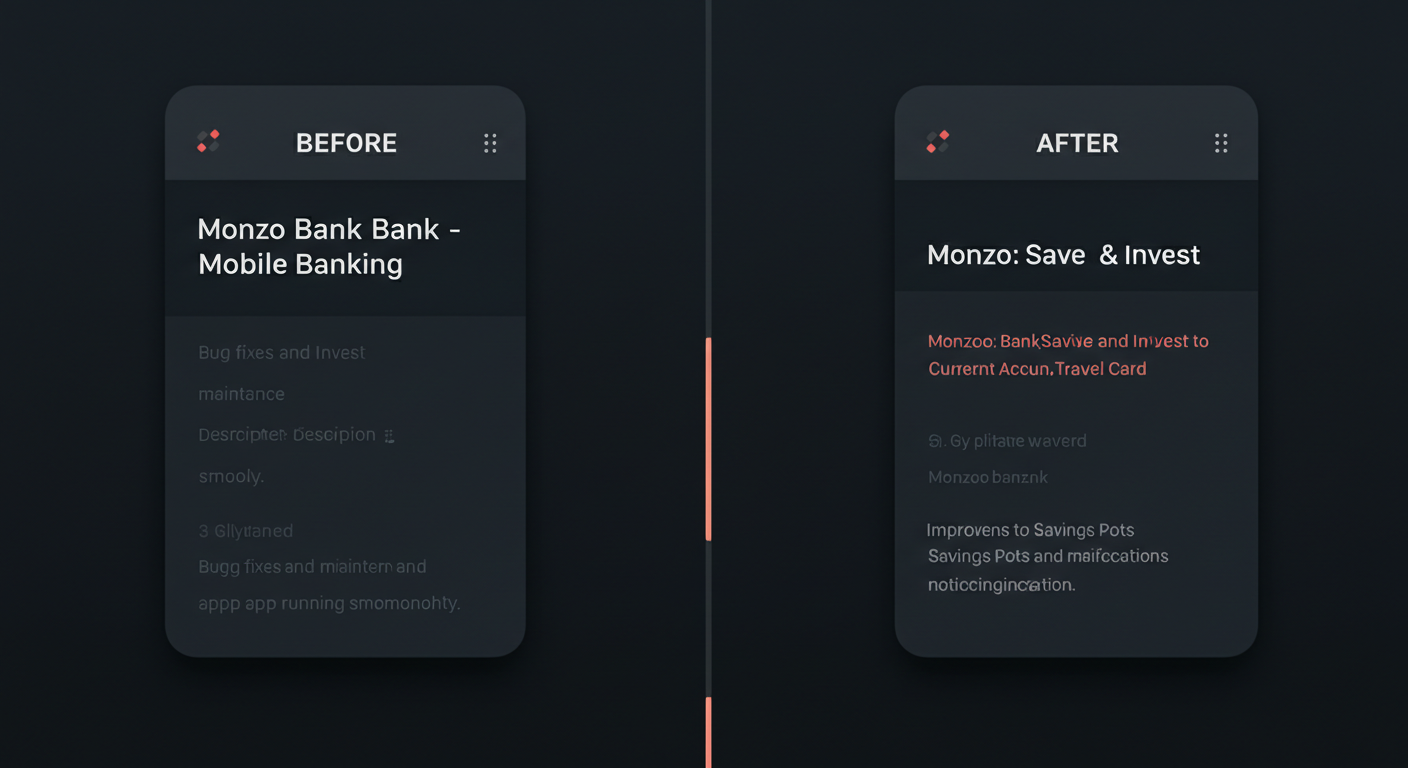
Audit finding: Monzo’s current title “Monzo Bank - Mobile Banking” targets a high-competition generic term and wastes the separator character. The description opens with brand statistics and a tagline rather than keyword-rich benefit copy. The three lines visible before the “more” tap are brand voice, not optimised for search. Fifteen consecutive “bug fixes and maintenance” release notes represent fifteen missed weekly algorithm signals.
Revised title (30 chars): Monzo: Bank, Save & Invest
Dropping “Mobile Banking” as too generic. Introducing “Save” and “Invest” where Monzo has genuine product depth its current title doesn’t signal at all.
Revised subtitle (30 chars): Current Account & Travel Card
“Current account” is a high-intent UK search term absent from Monzo’s current indexed fields entirely. “Travel card” is a genuine product differentiator with meaningful search volume that neither Lloyds nor HMRC targets.
Keyword field (100 chars): current account, budgeting, salary, savings pot, split bills, travel money, overdraft, ISA, send money
Each term either appears in Monzo’s description body without being pulled into indexed fields, or represents a gap where competitors are underperforming on search relevance. “Savings pot” in particular (Monzo’s most distinctive product concept) appears nowhere in any indexed field despite being a term closely associated with the brand.
Revised opening 3 lines: “Open a free UK current account in minutes. Track spending, save in Pots, split bills, invest from £1, and pay abroad with no fees, all in one app. Trusted by 15 million people.”
Eight indexable keyword phrases in two sentences, retaining the trust signal of the customer count at the end rather than the front.
Release note variants to rotate weekly:
- “Improvements to Savings Pots and spending notifications”
- “Faster payments and current account performance updates”
- “Travel card and currency exchange improvements”
- “Split bills and payment scheduling updates”
- “Monzo Flex credit card and investing improvements”
All accurate. All replacing fifteen weeks of wasted algorithm signals with feature-reinforcing keyword language.
Gap opportunity: Neither Revolut nor Lloyds explicitly targets “savings pot” in their title or subtitle. Monzo invented the concept and it carries genuine brand recognition and meaningful search volume. Owning it in the subtitle would be low competition, high brand fit, and a clear differentiator against both a traditional bank (Lloyds) and a feature-rich challenger (Revolut) that doesn’t use the term.
The Honest Cost Picture
Most teams asking about this workflow already have a paid LLM subscription. Claude Pro at $20/month or ChatGPT Plus at a similar price. This isn’t extra spend. It’s a reuse of budget that already exists, applied to a new workflow.
- Sensor Tower (incl. data.ai / App Annie): Enterprise pricing. Market estimates, ASO, ad analytics.
- AppFollow: From ~£49/month. ASO reports, review monitoring.
- AppFollow + Improvado MCP integration: £49/month + enterprise Improvado pricing. ASO data piped to an LLM, no mobile domain context.
- MobileAction: From ~£69/month. Keyword tracking, competitor ASO.
- Appfigures: From ~$19/month. Install tracking, basic ASO.
- AppRadar: From ~£49/month. ASO tools, review management.
- Appnalysis registered (free tier): Free. App intelligence, chart data, release cadence, competitor listings, compliance signals, SDK data.
- Claude Pro / ChatGPT Plus: ~$20/month (existing spend). ASO interpretation, copy, keyword strategy, release notes.
- Combined: Free to start, or ~$20 reusing existing LLM budget. Domain-intelligent Agent plus full interpretation layer.
The AppFollow plus Improvado row deserves a specific note. Improvado is a generic data integration platform that can pipe ASO metrics from AppFollow into an LLM, but it has no mobile domain expertise. The LLM receives raw numbers without the regulatory context, technical signals or competitive intelligence that Appnalysis structures into its responses. Improvado’s pricing is also enterprise-level, making the combined stack significantly more expensive than the free or low-cost Appnalysis path.
Agentic Workflows: Intelligence Without the Dashboard
Traditional ASO tools require someone to log into a dashboard, pull a report, read it, and make a decision. That’s a human in the loop at every stage, every time.
The shift underway in how teams consume intelligence is away from dashboards and toward agentic or ambient workflows, where intelligence surfaces automatically inside the workflow where decisions are already being made, without anyone needing to visit a tool or run a report.
Appnalysis via MCP is positioned exactly here. A team doesn’t log into a dashboard. They ask a question in Claude, or schedule a query that runs automatically and delivers a weekly ASO update into their existing workflow. The intelligence comes to them.
What makes this different from connecting a generic data source to an LLM is that Appnalysis itself runs an agentic loop when it receives a question. It doesn’t return raw data. It observes, reasons across multiple mobile data sources, and synthesises an interpreted answer. Claude then reasons over that interpreted answer to produce ASO recommendations. Two Agents, two areas of expertise, one workflow.
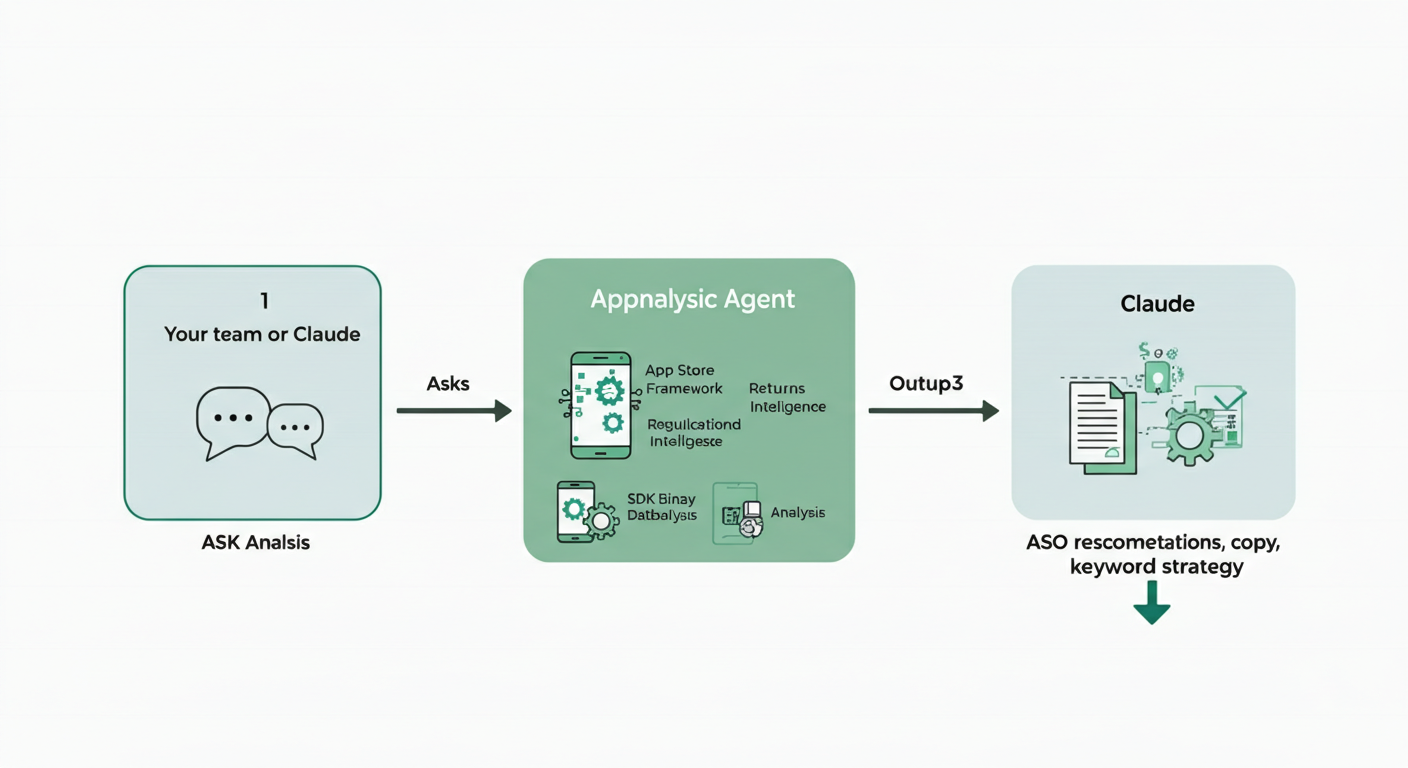
Claude Cowork (available in Claude Desktop) handles longer, multi-step autonomous tasks without requiring a prompt at each step. You can instruct it to take a set of Appnalysis outputs and work through a full ASO audit as a single initiated task (keyword audit, revised copy, release note variants, competitive gap) without hand-holding each step.
A lightweight automation layer using Zapier or Make can trigger the Appnalysis query on a weekly schedule via MCP, pipe the output into Claude, and deliver a periodic ASO update automatically. What changed in the competitive set this week. Whether any keyword adjustments are warranted. A ready-to-use release note for the next update. This is the closest thing to a fully automated periodic ASO workflow at this price point, without any engineering resource required to set it up.
A Note on Other LLMs
This workflow has been built and tested using Claude, which handles structured competitive analysis and copy tasks particularly well. The same two-prompt structure works directly with ChatGPT, Gemini, Copilot and other capable models. The Appnalysis Agent is what grounds the analysis regardless of which LLM you use.
Different models bring different additional strengths worth considering. Gemini integrates natively with Google Workspace, meaning teams that store brand guidelines, past ASO reports or product roadmaps in Google Docs can pull that context into the analysis alongside the Appnalysis data. Claude’s Cowork feature handles multi-step autonomous tasks particularly well for the periodic workflow described above. The model is the interpretation layer. Choose the one that fits your existing workflow and the integrations your team already uses.
Getting Started
Register for a free Appnalysis account, run Prompt 1 against your own app or a competitor you want to understand, then bring the output to your LLM with Prompt 2. The first run takes less than fifteen minutes and produces immediately actionable recommendations.
Go Deeper
- We Asked Claude to Answer a Simple App Store Question: why AI assistants hit a data wall on App Store questions without a specialist data layer
- We Asked Claude a BNPL Privacy Question: how the same workflow surfaces compliance signals standard ASO tools miss entirely
- Why Claude, ChatGPT and Gemini Still Struggle With Some Questions: the structural explanation behind the data access problem this workflow solves
- The Software Industry Is Growing Up: why compliance signals in App Store metadata are becoming as strategically important as ranking signals
Learn more about Appnalysis
Explore how Appnalysis turns mobile app intelligence into evidence-backed answers:
- Try the ASO workflow in /ask
- How Appnalysis connects via MCP
- The Appnalysis platform
- Appnalysis pricing
- For agencies
- For product teams