You Vibe-Coded Your App: what you shipped and mobile app compliance
Something significant happened to mobile app development in 2026. App releases were up 60% year-on-year across both the App Store and Google Play in Q1, with iOS alone up 80%. At Google I/O, Google launched native Android app creation in AI Studio, explicitly targeting non-technical creators for the first time. Claude Code, Xcode's AI assistant, GitHub Copilot, Cursor and Replit are all directly cited as the reason for the surge.
This is genuinely good news. More people building more things means more ideas reaching the market than ever before. It also means more developers, agencies and product teams shipping apps without fully understanding what those apps collect, declare, store or expose once they are in users' hands.
Stanford Law School put it clearly in their April 2026 analysis of Claude Code and App Store submission: AI coding tools are powerful at the front of the development lifecycle (ideation, scaffolding, code generation) but "at the back of the development life cycle, where compliance, privacy disclosure, security architecture, and App Store submission live, the human cost reasserts itself." A developer who has moved quickly through scaffolding and generation "arrives at those phases with the tool's momentum behind them and its limitations fully exposed."
That gap is real, measurable, and shows up in ways most teams do not anticipate. A Veracode study from Spring 2026 found that AI-generated code passes security checks only 55% of the time. The tools build fast. The gaps show up later.
The three stories below each belong to a different kind of builder. All three are real patterns.
1. The Indie Developer: The AI Feature That Collected Location Data Nobody Asked For
An indie developer is building a community app. They want users to be able to upload photos and have the app suggest relevant tags using image recognition. They ask Claude Code, or Xcode's AI assistant, or Copilot to add the feature using Apple's Vision framework.
The feature gets built. It works exactly as described. The developer tests it, the recognition works correctly, and they move on.
What nobody flagged, not the developer and not the AI tool, is that every image a user uploads contains EXIF metadata embedded in the file itself. GPS coordinates showing where the photo was taken. The device model. Sometimes the camera serial number. A precise timestamp. None of this is in the image content the developer was thinking about. It is in the file wrapper around that content, and it travels with every upload.
The app is now collecting precise location data. Not through any API the developer called. Not through any permission they requested. Through data that was already embedded in files their users chose to share.
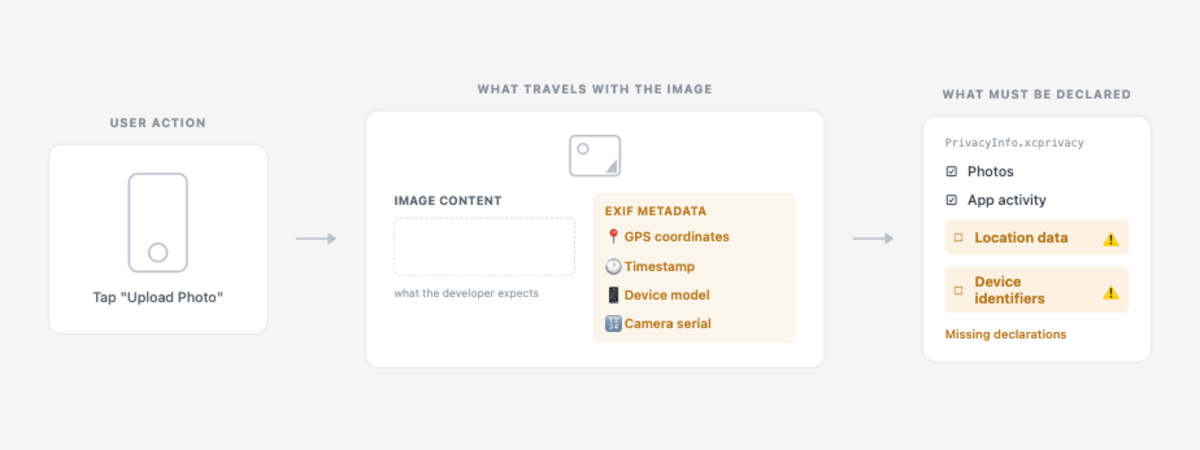
Under Apple's privacy manifest requirements, location data must be declared in PrivacyInfo.xcprivacy with an approved reason for its use. Under Google Play's Data Safety requirements, the same data must be declared with purposes stated and collection confirmed. In almost every case like this, neither declaration exists, because the developer genuinely did not know the data was being collected.
The outcome depends on timing. If Apple's reviewer catches the discrepancy between declared data and actual collection, the app is rejected and the developer spends days working out why. If it slips through, the data is collected for months or years. Eventually a user notices, or a regulator does, or an enterprise customer's procurement team runs a data audit and finds it.
This is not a bug. The AI did exactly what was asked. The gap is between what the feature does and what the developer understood the feature to do.
2. The Agency: The App That Went Global Without Anyone Deciding To
An agency builds a productivity app for a UK client. The brief is clear, the scope is defined, the budget is fixed. The agency delivers on time and on spec. The client is happy.
The client's marketing team submits the app to the App Store. The App Store defaults to distributing in 175 territories. Google Play defaults to 190 countries. Neither platform asks anyone to confirm this before submission. The default is global, and opting out of specific territories requires active configuration that nobody on either side thought to do.
Three months later the app gets featured in the US App Store. Within a week, 40% of the users are American. The client is now subject to CCPA for California users, COPPA if any users are under 13, and state-level privacy laws in Virginia, Colorado and Texas. Their analytics SDK is sending data to EU servers, raising a cross-border data transfer question under GDPR that nobody considered at the time of build. Their privacy policy still says "UK users only."
Nobody made a decision to launch in the United States. The App Store made it for them, by default.
The agency delivered what was scoped. But the scope never included the regulatory exposure that comes with unexpected global traction. Now there is a difficult conversation with the client, and the agency is fielding questions about CCPA and COPPA that were never part of the brief.
The age rating compounds this. The 4+ rating that was set without much thought, because there was nothing explicitly adult in the app, turns out to carry significant weight across multiple jurisdictions simultaneously.
In the UK, a 4+ rating on an app collecting personal data means the ICO Children's Code potentially applies. Since June 2025, its principles are embedded in UK GDPR Article 25 as a binding legal requirement, with fines up to £17.5 million or 4% of global annual turnover. In the US, 4+ brings COPPA into scope for any users under 13. In the EU it interacts with GDPR Article 8 on children's consent. In Australia it engages the Privacy Act.
Four different regulatory frameworks, activated by one age rating decision that took three seconds and a default distribution setting that nobody consciously made.
Apple's review times have stretched to 14 to 45 days because of the volume of AI-generated submissions. Getting this wrong means weeks of delay and a client conversation nobody wants to have.
Ask Appnalysis: "Which territories is this app currently ranked in across iOS and Android, and what are the primary data protection regulations that apply in each of those markets?"
3. The Product Team: The Security Pattern Found in Established Finance Apps
This example comes from real Appnalysis binary analysis of finance apps in the UK App Store. Not indie apps. Not weekend projects. Apps from established brands with professional engineering teams, code reviews, and in many cases dedicated security and compliance functions.
Apple rejected more than 2 million app submissions in 2025 and blocked $2.2 billion in fraudulent transactions. Security and privacy issues were among the leading causes. What Appnalysis binary analysis found in a meaningful number of UK finance apps, including apps from brands that would consider themselves security-conscious, stored OAuth tokens and refresh tokens in NSUserDefaults rather than the iOS Keychain.
To understand why this matters, it helps to understand what these two things actually are.
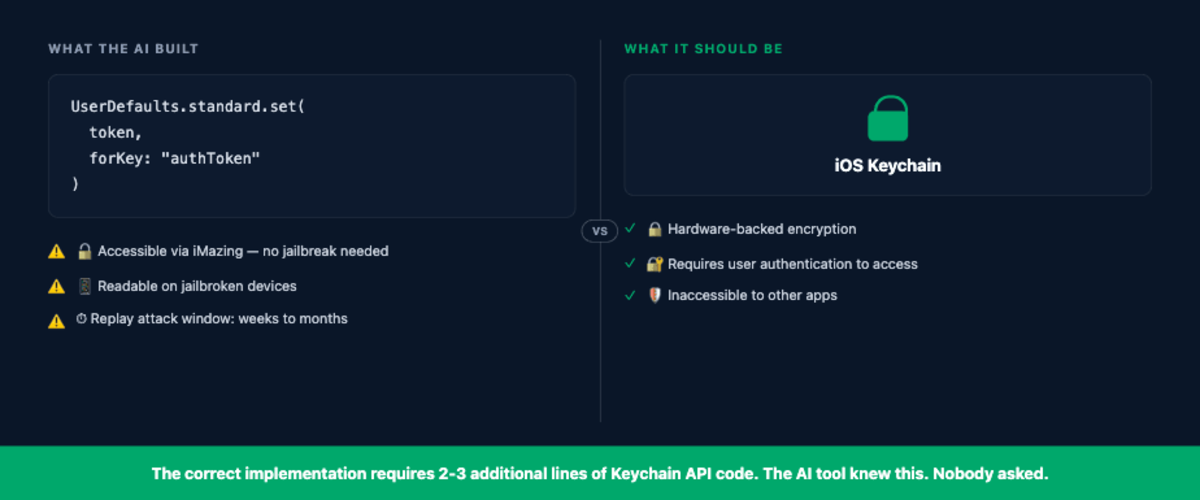
The iOS Keychain is Apple's hardware-backed encrypted storage, designed specifically for sensitive credentials. Access requires explicit user authentication. Another app cannot read it. Even with physical access to the device, extracting Keychain data requires significant technical effort and specialist tools.
NSUserDefaults is a plain text property list file stored in the app sandbox. On a non-jailbroken device it is sandboxed from other apps, but it is accessible to anyone with physical access to the device using commercially available tools like iMazing or iFunBox, with no jailbreak required. On a jailbroken device it is trivially readable by any process with sufficient permissions.
The practical consequence is a replay attack. An attacker who extracts an OAuth token from NSUserDefaults can present it directly to the authentication server as a valid credential, authenticating as that user without ever needing their password. Access tokens carry this risk for hours to days depending on their expiry configuration. Refresh tokens, which are long-lived by design, carry it for weeks to months. In a finance app handling real money and real account access, that exposure window is not acceptable.
This is OWASP Mobile Top 10 M9: insecure data storage. Specifically, sensitive data in NSUserDefaults without encryption. It is consistently one of the most commonly found vulnerabilities across mobile apps. The reason it persists even in professional engineering environments is straightforward: when a developer, regardless of experience level, asks Claude Code, Copilot or Xcode's AI assistant to implement "remember me" or "stay logged in" functionality, the tool will often reach for NSUserDefaults. It is the simplest, most widely documented approach across tutorials, Stack Overflow answers and developer blogs. The code works. Nothing in the development process raises a flag.
The correct implementation requires two or three additional lines using the Keychain API. The AI tool knows this. It simply does not volunteer it because nobody asked specifically about secure credential storage.
For a product team at a finance brand, the consequences extend beyond the security risk. PCI DSS compliance requires secure credential storage. UK GDPR requires appropriate technical and organisational measures to protect personal data. A refresh token sitting in NSUserDefaults fails both requirements, and the exposure is only visible through binary analysis, not code review, not standard testing, and not App Store review.
Appnalysis mobile app analysis has also found development artefacts inside shipped app package from the same apps: README files, build scripts, internal configuration notes, and occasionally .env files generated by AI coding tools during development and never excluded from the app bundle at build time. Anyone who decompiles the binary can read them. None of it intentional. All of it invisible without binary analysis.
Before You Submit: What Your App Is Actually Carrying
Every example above shares the same dynamic. The builder was not negligent. They were not cutting corners deliberately. They were building something with the best tools available, and the compliance and security implications of what they built were simply not visible in the development process.
The question worth asking before App Store or Google Play submission, whether you are an indie developer, an agency handing over to a client, or a product team at an established brand, is whether there is a way to surface those implications before they become a rejection, a regulatory notice, or an incident.
There is. And it does not require a lawyer or a compliance consultant to get a useful first answer.
Here is a prompt run live against Appnalysis, using a realistic set of data assets and libraries from a developer who had never thought about what those assets meant from a regulatory perspective:
"I am building a mobile app for iOS and Android. My app collects user registration data (name, email, password), processes images using AI vision to recognise objects, uses Bluetooth Low Energy beacons to detect user proximity to locations, and records audio for voice notes. My third-party libraries include Firebase Analytics, Amplitude and AWS for storage. The app will be available globally. What regulations should I be considering, what should my PrivacyInfo.xcprivacy file declare, and what are the key compliance questions I need to answer before submitting?"
What Appnalysis returned: six regulatory frameworks from one prompt.
UK and EU GDPR: A Data Protection Impact Assessment is required. Lawful basis must be established for each data type collected. Data minimisation principles apply across all four categories.
EU AI Act: The image recognition processing may constitute a high-risk AI system under the Act, triggering classification, risk assessment and conformity requirements that most developers and agencies have never considered.
iOS privacy manifest (PrivacyInfo.xcprivacy): User registration data, images, audio and BLE location data all fall under "Data Linked to You." Any use of Firebase Analytics or Amplitude for targeting purposes involves "Data Used to Track You," requiring explicit ATT consent from each user.
Google Play Data Safety form: Location (from BLE), audio files, personal info and app activity each require accurate declaration, with purposes stated, encryption confirmed, and a data deletion mechanism provided for users.
UK Online Safety Act 2023: If the app allows sharing of user-generated images or audio between users and is accessible to children, Ofcom obligations apply regardless of whether children are the intended audience.
US state-level privacy law: CCPA, CPRA, and equivalent laws in Virginia and Colorado apply the moment significant US user numbers are reached, which as example 2 showed, can happen without any active decision to enter the US market.
Six regulatory frameworks surfaced from a single prompt describing four data assets and three libraries. A developer or agency using Claude Code or Xcode's AI assistant would not have received any of this. The tools built the features. They did not map what those features mean once the app ships to 175 territories by default.
Two data types worth expanding on:
Bluetooth Low Energy beacon detection does not feel like location tracking. It feels like a proximity feature, a retail experience, a way to know when a user is near something. Under both UK GDPR and PECR, it is location data, and it must be declared as such in both the PrivacyInfo.xcprivacy file and the Google Play Data Safety form. PECR applies specifically to the storage and access of BLE signal data on the device before it is even transmitted.
Audio recording for voice notes feels like user-generated content. Under CCPA and CPRA in California it carries specific disclosure requirements. In Illinois, if any voice processing takes place, it may engage the Biometric Information Privacy Act. In the UK, if any biometric processing occurs, it sits under UK GDPR as potentially special category data with significantly higher compliance obligations.
Neither is obvious to a developer, an agency or a product team who asked an AI tool to "add voice note functionality" or "detect when the user is near a beacon."
Try this with your own app before you submit:
"Here are my app's data assets: [your data types]. Here are my third-party libraries: [your SDKs]. My app will be distributed globally on iOS and Android. What regulations apply, what should my PrivacyInfo.xcprivacy declare, and what should my Google Play Data Safety form include?"
The answer will not replace legal advice. But it will give you the map before you need a lawyer to explain why you did not have one.
Frequently asked questions
Also Worth Reading
- When Claude Code Meets Apple's App Store: Stanford Law School, April 2026. A framework-level analysis of where AI coding tools succeed and fail across the development lifecycle. Concludes that compliance, privacy disclosure and security architecture are the phases where "the human cost reasserts itself." Useful context for understanding why the gaps in this article are structural, not accidental.
- Why You Can't Vibe Code to Compliance: Secure Privacy, July 2026. Covers GDPR and SOC 2 compliance gaps in AI-generated code generally. Strong on the regulatory argument but does not cover mobile-specific requirements, territory expansion, or binary analysis findings.
- Mobile App Security Risks in AI Vibe Coded Apps: NowSecure, April 2026. A first-person account of building a vibe-coded app and discovering the security gaps. Useful for understanding how the experience plays out in practice. Does not cover regulatory exposure or binary analysis of production apps.
- Vibe Coding Security Checklist 2026: Invicti. A comprehensive checklist approach covering authentication, API security and secrets management. Web-focused rather than mobile-specific, and covers what to fix rather than how to understand the compliance landscape before submission.
Go Deeper on Appnalysis
- We Asked Claude a BNPL Privacy Question: Appnalysis surfacing a regulatory finding (the ICO Children's Code exposure) that no developer or agency would have found without binary and regulatory analysis
- The Software Industry Is Growing Up: why evidence is replacing declarations as the currency regulators, investors and enterprise buyers actually trust
- How to Use Appnalysis and Claude for ASO Work: the same workflow applied to App Store optimisation, for agencies and product teams managing live app listings
- Appnalysis Is a Mobile Intelligence Agent: how to connect Appnalysis to Claude Code and other AI workflows via MCP for ongoing intelligence rather than one-off queries
Learn more about Appnalysis
Explore how Appnalysis turns mobile app intelligence into evidence-backed answers:
- Try Ask Appnalysis in your browser
- How Appnalysis connects via MCP
- The Appnalysis platform
- Appnalysis pricing
- For agencies
- For product teams
Published by Appnalysis. Mobile intelligence for the agentic age.
What this means for mobile app compliance
The SDKs, trackers and permission calls a vibe-coded app inherits are exactly what mobile app compliance work has to reason about. See how regulators and policy teams use Appnalysis to run the same audit at ecosystem scale.