How to Use Appnalysis and Claude to Build a Competitor Watchlist
A practical guide to finding new entrants, scoring competitive proximity and automating a weekly intelligence report
This guide is the practical companion to How to Build a Competitor Watchlist for Mobile Apps. That article explains what competitive proximity means and why most watchlists miss the rivals that matter. This guide shows you how to build the workflow.
You will need a registered Appnalysis account (free to start) and access to Claude, ChatGPT, Gemini or whichever LLM you already use. The surface proximity workflow runs entirely on the free registered tier. SDK and app package analysis requires a paid tier. See the Appnalysis pricing page for details.
Step 1: Understand Your Category Right Now
Before finding new entrants, establish your current baseline. Ask Appnalysis:
“What are the top 10 free apps in the [your category] category on iOS in [your market] right now? For each app, tell me what it does, who makes it, and what data it collects.”
This does two things a standard ranking tracker does not. First, it contextualises each app, and you will immediately see which are genuine competitors and which are noise (different segment, miscategorised, or irrelevant to your product). Second, it surfaces data collection profiles, which is the first signal of product proximity.
When we ran this for UK iOS finance, Testerup appeared at position 7, a German survey app with no competitive relevance to neobanks. Without contextualisation, it would have been added to the watchlist. With Appnalysis intelligence, it was immediately filtered as noise. Zable at position 10 was the opposite: FCA-regulated, credit-focused, 246,000 reviews, weekly release cadence, directly competitive with Monzo Flex.
Step 2: Find the Apps You Do Not Know About Yet
This is the query that no standard ranking tracker can answer. Ask Appnalysis:
“For the [your category] category on iOS in [your market], which apps have recently entered the top 100 or shown significant upward movement in the last 30-60 days? For each one, tell me what it does, who makes it, what data it collects, and whether it could be a competitive threat to [your app].”
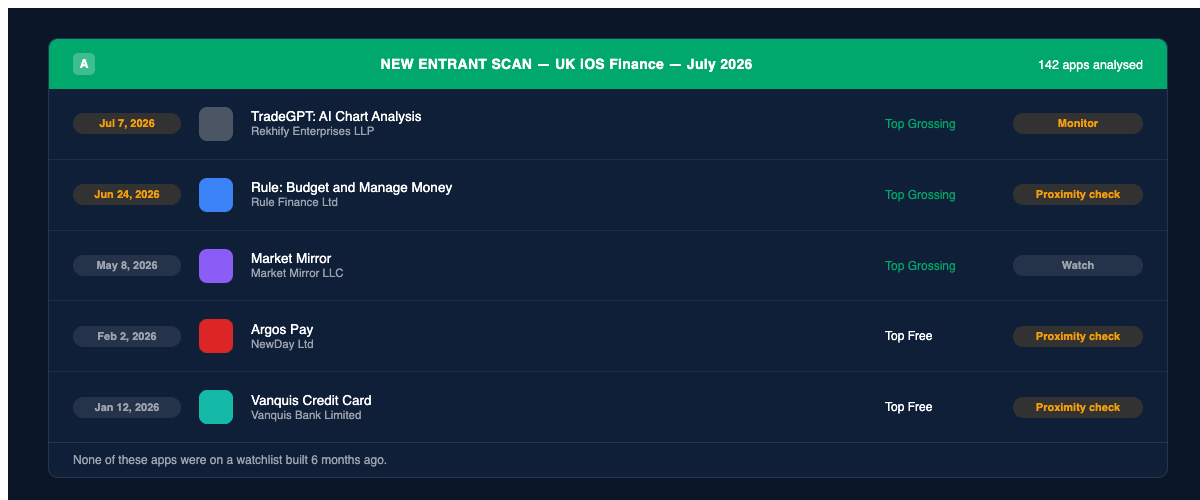
When we ran this for UK iOS finance, Appnalysis analysed 142 unique apps across Top Free, Top Paid and Top Grossing charts simultaneously and surfaced:
TradeGPT: AI Chart Analysis, released July 7, 2026. Four days old, already in Top Grossing. An AI-branded trading analysis app achieving immediate chart visibility.
Rule: Budget and Manage Money, released June 24, 2026. Two weeks old, already Top Grossing. A UK-built budgeting app with rapid early traction worth a proximity check before it becomes a name everyone knows.
Market Mirror, released May 8, 2026. Two months old, sustained Top Grossing presence. Consistent early performance from a very recent entrant.
Argos Pay by NewDay Ltd, released February 2, 2026. A major UK retailer bringing financial services into the Top Free chart. A different kind of competitive threat from a startup but one that would be easy to miss on a watchlist built six months ago.
Vanquis Credit Card, released January 12, 2026. FCA-regulated, credit-focused, Top Free chart. A direct competitor to Monzo Flex and Zable that appeared this year and may not be on watchlists built before its launch.
A conventional watchlist would have shown none of these, because you would have had to add them before knowing they existed. Appnalysis found them by querying 142 apps simultaneously across all three charts.
Step 3: Find Apps Similar to Yours
Ask Appnalysis:
“Find apps similar to [your app] on iOS in [your market].”
When we ran this for Monzo Bank, Appnalysis analysed 103 unique apps from multiple sources: thematic similarity, App Store “Customers Also Bought” data, and live chart rankings. It returned a tiered list showing which apps appeared across multiple sources (highest confidence competitors) versus those appearing in only one source.
Top alternatives appearing across multiple sources: Revolut, Starling, Chase UK, Wise, Zopa Bank.
Other similar apps: HSBC, NatWest, Lloyds, Halifax, Barclays, Nationwide, Santander, Pockit, Metro Bank, TSB, Zilch, Zable, Atom Bank, Moneybox, N26, Monese.
The source triangulation is what makes this useful. An app appearing in similarity analysis, top free chart and App Store suggestions simultaneously is a higher-confidence competitor than one appearing in only one source.
Step 4: Score Proximity and Build Your Watchlist
Bring the Appnalysis output to Claude, ChatGPT, Gemini or your preferred LLM:
"Here is Appnalysis intelligence on new entrants and similar apps in my category. For each app, please:
- Score its competitive proximity to my app on a scale of 1-5, with reasoning
- Flag any showing SDK or feature signals suggesting they are building toward my core product area
- Flag any expanding into my primary territory from adjacent markets
- Produce a one-paragraph summary of each genuine threat
- Recommend whether to add to Tier 1 (active monitoring), Tier 2 (watchlist) or ignore
Format the output as a structured report I can share with my product team."
The Three-Tier Dynamic Watchlist
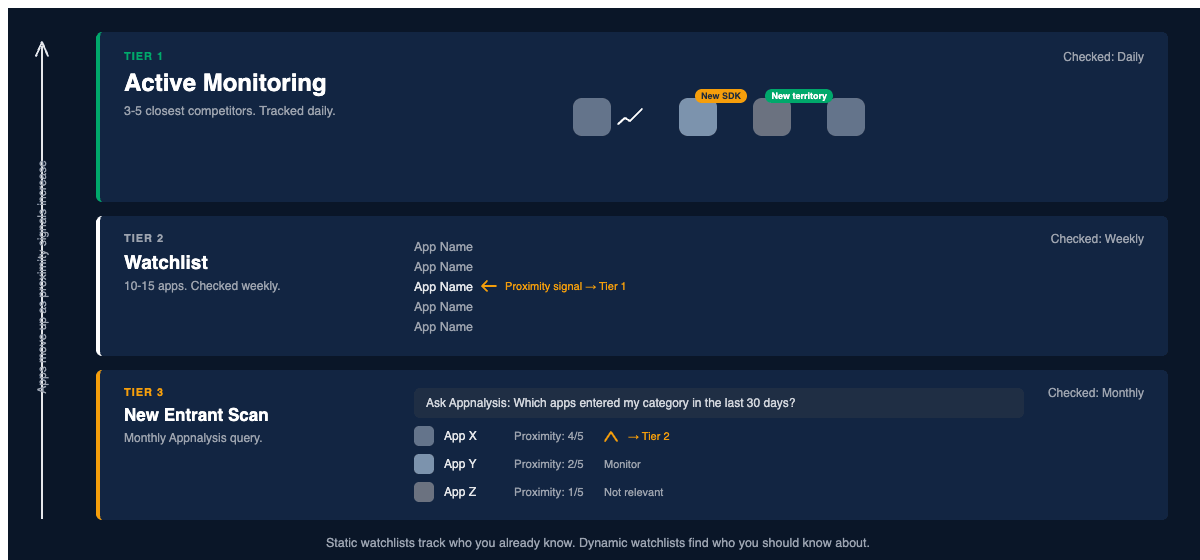
Once you have your initial proximity scores, organise your watchlist into three tiers:
Tier 1: Active monitoring. Three to five closest competitors by product proximity. Track daily: chart position, metadata changes, SDK additions, release cadence, territory expansion. These are the apps most likely to take your users in the next 90 days.
Tier 2: Watchlist. Ten to fifteen apps with meaningful surface proximity but lower product proximity. Check weekly. The trigger for moving an app from Tier 2 to Tier 1 is a product proximity signal: a feature addition, an SDK change or a territory entry that suggests they are building toward your space.
Tier 3: New entrant scan. Run monthly via Appnalysis. Returns candidates for Tier 2 with initial proximity scoring. Most will not make the cut. A few will. This is the tier that catches the rivals you would never have known to watch.
The Weekly Report
For teams who want structured output rather than raw intelligence, bring the Appnalysis data to your LLM with this report prompt:
"Here is this week’s Appnalysis competitive intelligence for [your app category] in [your market]. Please produce a weekly competitive intelligence report with the following sections:
Section 1: My position this week. Chart position across tracked territories, movement versus last week. Section 2: Known competitor movements. Tier 1 apps, what changed in chart position, metadata, SDKs or release cadence, and what each change signals. Section 3: New entrants this month. Apps from the monthly scan that warrant attention, with proximity score and recommendation. Section 4: Recommended actions. Two or three specific things my product or marketing team should consider this week."
Step 5: Automate the Workflow
Once running manually, several tools handle the full process autonomously:
Claude Cowork (available in Claude Desktop) runs the multi-step workflow as a single initiated task without requiring a prompt at each step.
ChatGPT Scheduled Tasks and Gemini Scheduled Actions (personal Google AI subscribers) offer similar recurring capability. For Gemini Enterprise users, scheduled agents with MCP integration are fully supported, though custom MCP connections require enterprise configuration rather than standard accounts.
For fully scheduled delivery, Zapier or Make triggers the Appnalysis query on a weekly or monthly schedule via MCP, pipes the output to your chosen LLM, and delivers the report to email, Slack or Notion. Your Monday morning competitive intelligence report, assembled overnight, ready before the week starts.
Why This Is Different From an App Ranking Tracker
Every app ranking tracker (AppFollow, Sensor Tower, Similarweb, Appfigures and others) requires you to define your competitor set before it can track anything. You tell it who to watch. It watches them.
Appnalysis is an App Store AI Agent. When it receives a question, it runs its own internal agentic loop: querying App Store and Play Store pipelines, app package analysis, SDK database, regulatory knowledge base and territory data simultaneously, reasoning across all of them, and returning interpreted intelligence rather than raw data. It analysed 103 unique apps to answer “which apps are similar to Monzo?” not because we asked it to analyse 103 apps, but because that is what answering the question properly required.
When your LLM calls Appnalysis via MCP, two agentic loops run simultaneously. The LLM handles reasoning, synthesis and output. Appnalysis handles the App Store intelligence layer. Neither does the other’s job. Neither could. The result is a watchlist that finds rivals you did not know to look for, scores them by how close they actually are, and delivers the intelligence in whatever format your team needs.
The SaaS model assumes everyone needs the same reports. The agentic model asks what intelligence your specific team needs today and produces it.
Go Deeper
- How to Build a Competitor Watchlist for Mobile Apps: the conceptual argument for why most watchlists miss the rivals that matter
- Mobile App Competitor Analysis: A Step-by-Step Guide: the broader framework for turning app intelligence into strategy
- How to Use Appnalysis and Claude for ASO Work: the same workflow applied to App Store listing optimisation
- Appnalysis Is a Mobile Intelligence Agent: how to connect Appnalysis to Claude and other AI workflows via MCP