Mobile App Development Trends: What Actually Ships
A mobile app development trend is only real when it is visible in the apps that have actually shipped, not just in the forecasts of what is coming. Trends in mobile applications matter to the product, engineering and investment decisions that get made on the strength of them, and the gap between the forecast and the shipped app is where most of the value gets lost.
Teams jump on mobile app trends before checking whether the trend is being adopted, underestimate the work required to ship the real thing, and then trust AI to cover what it cannot see. Three failure modes, one root cause. AI does make certain work genuinely cheaper (code writing, prototyping, UI variation, boilerplate). The failure modes come from mistaking cheap code for cheap experiments, cheap products or cheap businesses. The shipped app is where the evidence sits, and most trend and vibe-coding coverage never gets that close.
A related shift is worth naming up front. For twenty years the goal of a new product was MVP: the minimum viable product, shipped to test whether anyone wanted it. That framing assumed the code was expensive and the learning was cheap. Vibe coding and AI-assisted development have inverted that. The code is now the cheap bit. What has not got cheaper is everything a real business needs around the code: compliance, support infrastructure, payment handling, incident response, legal, monitoring, updates, customer service, refund flows, fraud handling, uptime. So the goal that matters, especially for anyone raising or deploying capital, is not MVP any more. It is MVB. Minimum viable business.
This article covers three things. How to check whether a mobile app development trend is actually being adopted before you build on it. What vibe coding security risks look like in mobile specifically, which is different from the web-and-general-code coverage that fills most search results. And what AI cannot see about your own app, even when you point it at the source.
Mobile app development trends versus what actually ships
Every year the mobile industry produces a wave of trend forecasts. Agencies publish "top 10 trends" listicles. No-code platforms predict which architecture is going to win. Analyst firms name the emerging categories. Some of it turns out to be right. Much of it turns out to be predictions of what apps will do, not evidence of what apps actually do.
The distinction matters because product and investment decisions get made on the forecast. A team decides to adopt the emerging framework because the trend list said it was coming. A founder pitches AI features into a deck because that is what the sector is doing. An investor writes a cheque based on category positioning that the shipped apps in the category do not yet reflect.
The evidence side of the same question looks different. Which SDKs are being adopted, measured by installs across a category over time. Which permissions are appearing more or less often in shipped apps. Which network endpoints real apps in the wild are contacting. Which platform APIs are being called at runtime, versus which ones the release notes said were coming. These are all answerable if you look at the shipped apps themselves.
For teams looking to track SDK adoption trends specifically as evidence of what the sector is actually doing, Mobile App Market Intelligence Tools: A Buyer's Guide and What Is Mobile App Intelligence? cover the tool landscape and the definitional frame.
Before you follow a mobile app development trend, five checks are worth running:
- Look for shipped evidence, not release-note evidence. Is the trend visible in apps that have actually shipped it, or only in vendor announcements and conference talks?
- Check adoption at your category level. A trend that is real in gaming may not be real in fintech. Category-specific SDK and permission adoption tells you where the trend is actually landing.
- Look at the shape of adoption, not just the count. A hundred small apps adopting something is different from ten large apps adopting it. Both are trends, but they mean different things.
- Check whether the trend has survived a full release cycle. A pattern that appeared six months ago and has not been reversed is a trend. A pattern that appeared last month is a data point.
- Verify the trend against your own shipped app. Sometimes the trend the team is chasing is one your app already implements. Sometimes it is one your app already rejected and no one on the current team remembers why.
The forecast list has its place. It is a useful map of what the industry thinks is coming. It is not a substitute for evidence about what is actually here.
Vibe coding security risks in mobile apps
Most vibe coding security coverage is about web and general code. The mobile version is different, because a mobile app has to survive platform review, run on devices the developer does not control, and ship a binary that a regulator or a security researcher can inspect at their leisure. Vibe coding security risks in mobile apps show up in specific, repeatable patterns.
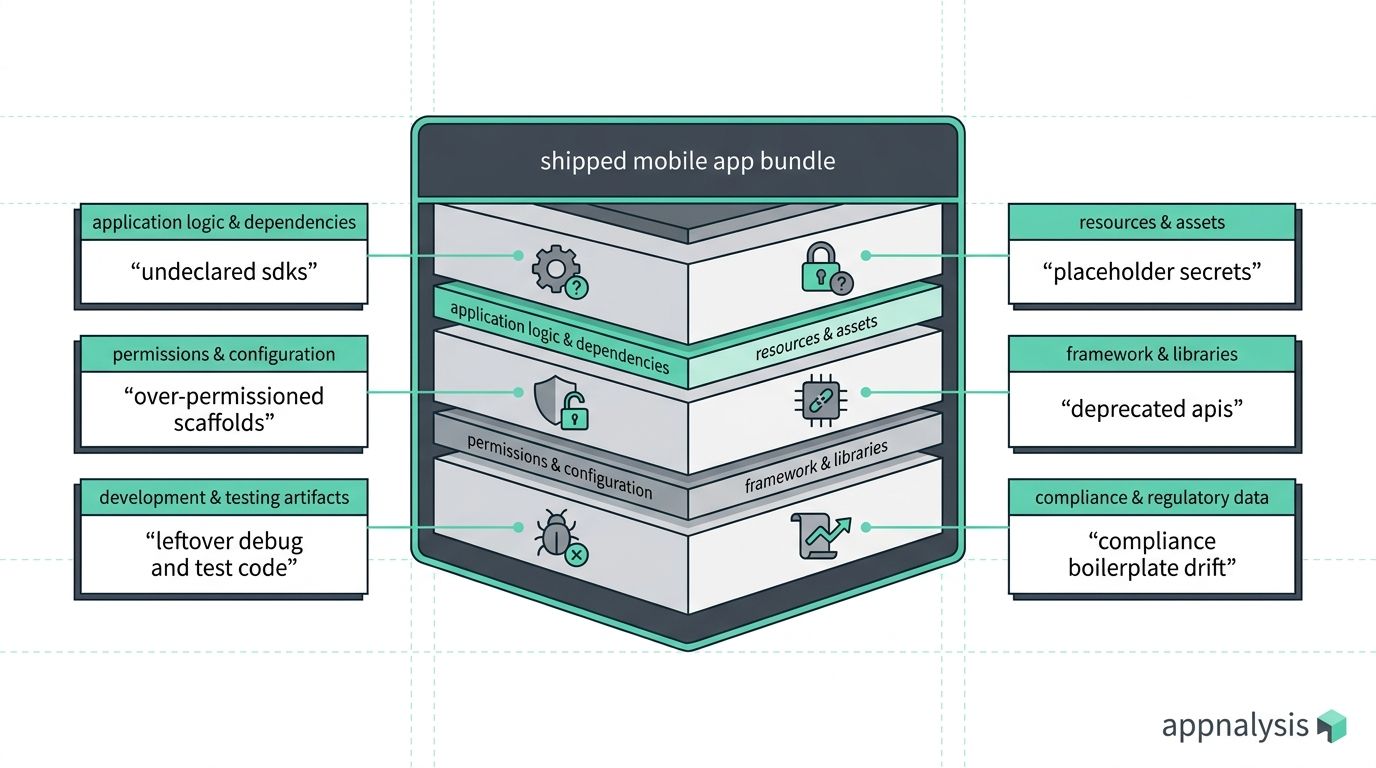
Undeclared SDKs pulled in by AI-generated code. LLMs generate code that pulls in dependencies. Sometimes those dependencies pull in further dependencies. The result is an SDK inventory in the shipped app that the developer never audited and often does not know exists.
Over-permissioned scaffolds. AI-generated app scaffolds tend towards asking for broad permissions rather than the specific ones the app actually needs. Location, contacts, storage, camera and microphone permissions appear in Info.plist and AndroidManifest.xml because the LLM saw them in the training corpus, not because the app functionally requires them. Platform review sometimes catches this. Sometimes it does not, and the app ships with more surface than intended.
Leftover debug and test code. Development-time endpoints hardcoded into the shipped build. Test API keys not swapped for production ones. Feature flags left on. Logging that leaks data in production because the LLM's boilerplate assumed a development environment.
Placeholder secrets in the binary. API keys, JWT signing secrets and credential material that made it into the shipped bundle because the LLM used "yourapikey_here" style placeholders and no human noticed they were still there when the app went live.
Deprecated APIs from the training-data cutoff. LLMs generate code against the APIs they saw in training. Mobile platform APIs deprecate frequently, and the LLM often does not know the current version. Apps ship using APIs that are now soft-deprecated, hard-deprecated, or replaced entirely.
Compliance boilerplate that does not match behaviour. Privacy policies, ATT prompts, App Store data safety declarations and Play Store data safety declarations generated by AI often describe the intended behaviour rather than the actual behaviour of the shipped app.
Apple has already responded to some of this at the platform level. In March 2026 Apple blocked Replit and Vibecode from directly submitting to the App Store, citing quality and compliance concerns with vibe-coded submissions, as covered in The New Agency Pitch. That is the platform's version of the same evidence gap: the apps looked fine in the tool that generated them, and the platform inspection saw something different in the shipped build.
For the wider pattern of what vibe-coded apps ship and what to check, The Vibe-Coded App: Here's What You Actually Shipped covers the specific angle in depth. For the vendor and SDK evidence layer that AI-generated code makes more urgent, Third-Party Risk Management for Mobile Apps covers the outward-facing pillar.
What AI cannot see in your own app
AI coding assistants and analysis tools are useful, but they have specific blind spots when the subject is an already-shipped app. Naming those blind spots matters, because most teams now use AI as their first-pass reviewer without asking what it can and cannot see.
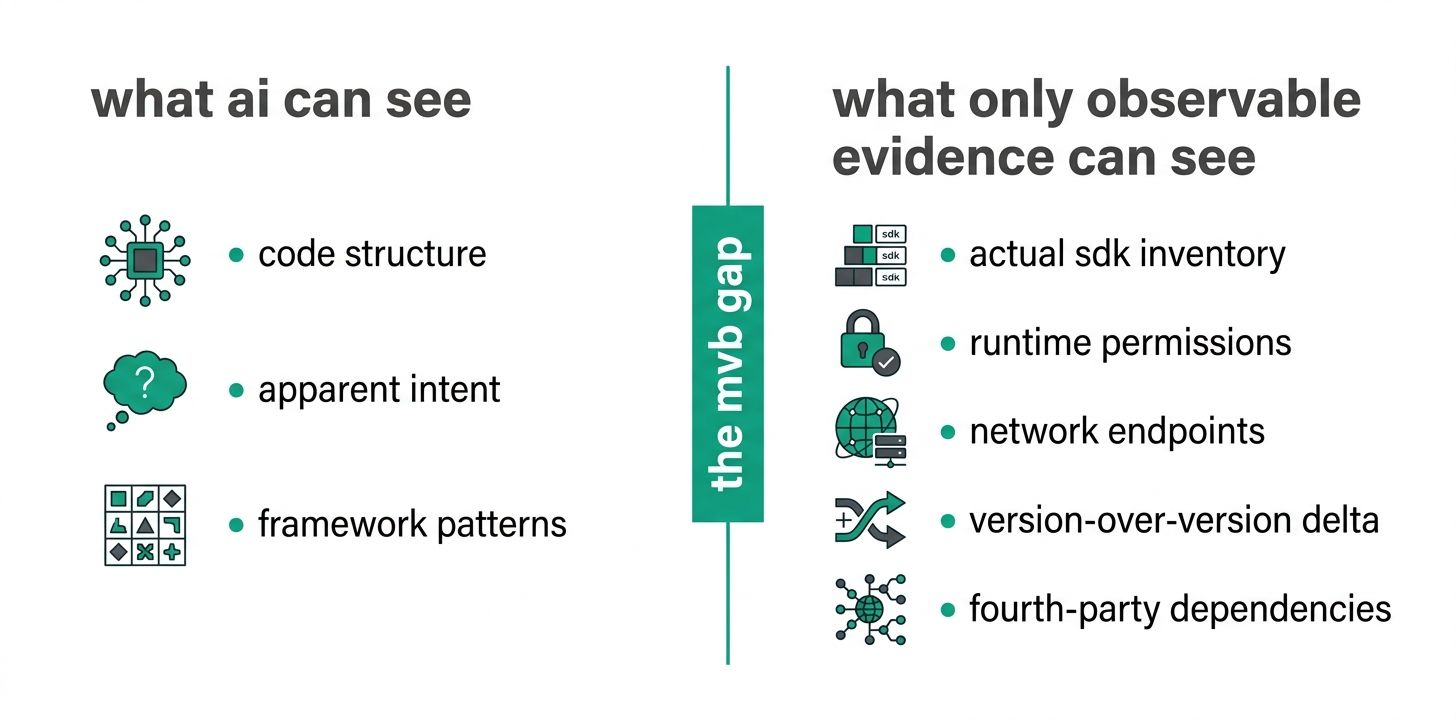
The training-data gap. An LLM knows the version of an SDK that was current when its training data was cut. It does not know what your version does now, unless it has been given the current documentation as context. In fast-moving areas (mobile OS APIs, ad-network SDKs, authentication providers), the gap between what the LLM thinks the SDK does and what the shipped SDK actually does can be substantial.
The ecosystem-awareness gap. LLMs do not know which SDK vendors are stable versus quietly failing right now, which frameworks the market is abandoning, which cloud services just changed pricing, which analytics platforms are being deprecated. That knowledge lives in continuous engagement with the ecosystem, not in a training snapshot.
The runtime-behaviour gap. LLMs cannot run your app on a real device and observe what it does. They can read the code and predict what it should do. Prediction from source is not the same as observation from the shipped build, and mobile is a domain where the two diverge more than most.
The specialist-knowledge gap. For the underlying pattern of what specialist knowledge LLMs cannot produce from training data alone, Your AI Coding Agent Only Sees Half the Picture covers the MCP-knowledge-specialists frame directly. In mobile, the specialist areas the LLM does not know well include low-power radio behaviour, device-specific rendering pipelines, cryptographic hardware integration, and hardware-specific power management.
The historical-context gap. An LLM does not know why your team made the architectural choices it did, which shortcuts were made under deadline, which SDKs were added and never removed, or which permissions were requested for a feature that was later cut. This is the same class of gap that a departed engineer leaves. AI does not fill it.
Observable evidence from the shipped binary fills three of these five gaps directly. The training-data gap and the specialist-knowledge gap survive: they need continuous ecosystem work and specialist input respectively. The other three (ecosystem awareness for what your app currently contains, runtime behaviour, and historical context reconstructed from version-over-version deltas) are exactly what a mobile app audit produces. For the audit process applied to your own inherited app, What Is Actually In Your Own App? A Mobile App Audit Guide covers the operational version.
The counter: doesn't AI make experimentation cheaper?
The strongest counter-argument to everything above is that AI genuinely does make experimentation cheaper, and cheap experimentation is how good products get built. It is worth engaging with on its merits rather than dismissing.
For the code part of a throwaway prototype, the productivity gain is real. Idea to clickable in hours. UI variations generated in minutes. Boilerplate that used to take a week takes an afternoon. Enough exposure to a new framework to try it out. Design system exploration at pace. Individual A/B test variant construction. These are legitimate unlocks, and teams that ignore them cede an advantage.
But experimentation is not the same as the code inside an experiment, and the parts that determine whether an experiment produces business value have not got cheaper. Store review time, app store optimisation, onboarding, compliance wrap, deployment, support tickets, and post-experiment cleanup all stayed exactly where they were. Instrumentation and statistical power stayed where they were. The learning phase, where a team looks at what an experiment produced and decides what it means, stayed where it was. Failed experiments still leave residue: users trained to expect a feature that then disappeared, privacy policies referencing removed functionality, analytics events pointing at code paths that no longer exist, compliance drift, support load, broken ASO commitments.
The compound effect matters especially for mobile. Ten experiments incurs ten sets of the fixed shipping-and-learning costs. Fifty experiments incurs fifty sets. Per-experiment cost drops slightly. Total cost goes up. And the throwaway prototype often does not get thrown away. The classic pattern, "we will rebuild properly if it works, it worked, we shipped the prototype", is more common with vibe-coded code, not less, because the prototype looks more shippable than it used to.
None of this means stop experimenting. It means AI has made the code part of experimentation cheaper, and has not made cheaper the parts that decide whether an experiment produces business value. Teams that treat cheap code as cheap experiments end up with more shipped variants and less learning per variant, plus a compliance and MVB overhead that scales with how many experiments they run rather than dropping. Looking at what actually landed in the shipped app, and what it left behind, is how you tell whether all that experimentation is generating learning or just generating noise.
Why this matters more for investors than it used to
The traditional investor due-diligence process for a mobile app company was built around the assumption that shipping software was hard, so the code itself was the artefact worth verifying. Code review, repo access, engineering team interviews.
In an era where a working prototype can be generated in an afternoon, that assumption is upside down. The code is no longer the scarce, hard-earned artefact. What is scarce is everything a real business needs around the code: compliance that survives platform review, operational infrastructure that survives a real user base, a vendor and SDK stack that has been assessed rather than assumed, and behaviour that matches the pitch deck. That is the MVB question. And it is answered by looking at what the shipped app actually does, not by reading the source.
If you have not yet come across the related pieces on the Appnalysis site, Technical Due Diligence for Mobile Apps covers the pre-transaction version of this work for acquirers. Third-Party Risk Management for Mobile Apps covers the vendor and SDK evidence layer. What Is Actually In Your Own App? A Mobile App Audit Guide covers what to do when your own team has lost track of what is inside your product.
How Appnalysis fits
Appnalysis pulls the evidence that these questions need out of the shipped app itself. SDK adoption data across categories. Runtime behaviour on real devices. Permission and network profiles. Version-over-version deltas. And the fourth-party dependencies that AI-generated code pulls in without declaring.
Different teams use it for different things. A product team uses it to separate trend forecasts from actual trend adoption. A founder or investor doing MVB due diligence uses it to check that the shipped app matches the pitch deck, and that the vendor stack is what the team said it was. A security team uses it to inspect vibe-coded submissions before Apple or Google inspect them. An agency inheriting an AI-built prototype uses it as a starting point rather than guessing.
Appnalysis does not replace the strategic decision about which trends to follow, the engineering judgment about which AI tools to trust for which work, or the security team's threat modelling. The evidence supports those decisions. The decisions still belong to whoever is making them.
The /product and /agencies pages have more on how it is used by in-house teams and by agencies.
Closing
Trends are not the enemy. Vibe coding is not the enemy. AI coding assistance is not the enemy. What causes trouble is treating the forecast, the generated code or the AI's own review as the finished thing rather than as one input into it.
Real products get judged on what they do when a real user opens them. Real businesses get judged on what happens when things go wrong. Real investment cases get judged on whether the shipped product matches the pitch. In all three, the shipped app is the thing being judged, and that is where the evidence needs to come from.
Frequently asked questions
Further reading
External references
- Apple developer guidance on App Store review. The platform-side backstop that catches some of what AI-generated submissions ship.
- Google Play Data Safety requirements. The Android-side equivalent for what apps declare versus what they do.
- OWASP Mobile Application Security Verification Standard (MASVS). The security-audit reference alongside a shipped-behaviour audit.
Related reading on the Appnalysis site
- What Is Actually In Your Own App? A Mobile App Audit Guide. The operational version of the audit process this article's checks feed into.
- The Vibe-Coded App: Here's What You Actually Shipped. The vibe-coding-specific evidence angle in depth.
- Third-Party Risk Management for Mobile Apps. The pillar covering vendor and SDK evidence layer.
- Technical Due Diligence for Mobile Apps. The investor-and-acquirer version of MVB verification.
- The New Agency Pitch. Agency and client evidence-sharing in the LLM era.
- Your AI Coding Agent Only Sees Half the Picture. What AI cannot produce from training data alone.
- What Is Product Intelligence for Mobile Apps. The wider evidence layer this article's applications sit inside.
- What Is Mobile App Intelligence?. The definitional frame.
- Mobile App Market Intelligence Tools: A Buyer's Guide. Tool landscape for tracking SDK adoption trends.
- Mobile App Compliance Comparison with OWASP. Compliance-and-security testing angle referenced in the vibe-coding section.